
For HR and people leaders
A recognition program that’s fair, and that you can show is working
Laurel gives HR the rules, approvals and reporting to run recognition as a real program: types that mean something, the right approvers for the awards that matter, a view of who’s being missed, and one console to run it all, inside your own Microsoft 365.
What changes for HR
Set the rules once. Everyone else just says thank you.
Types with rules
Who can send each type, who can receive it, how many each person can give, and an organization-wide cap.
The right approvers
The manager chain, or named approvers such as a safety lead or an HR panel, in one or more steps.
Who’s being missed
Every manager sees who on their team hasn’t been recognized in 90 days. You see it across the organization.
A record
Every configuration change, wording edit and approval decision in an audit log, with who and what.
The program owner’s view
Run the program, not a spreadsheet
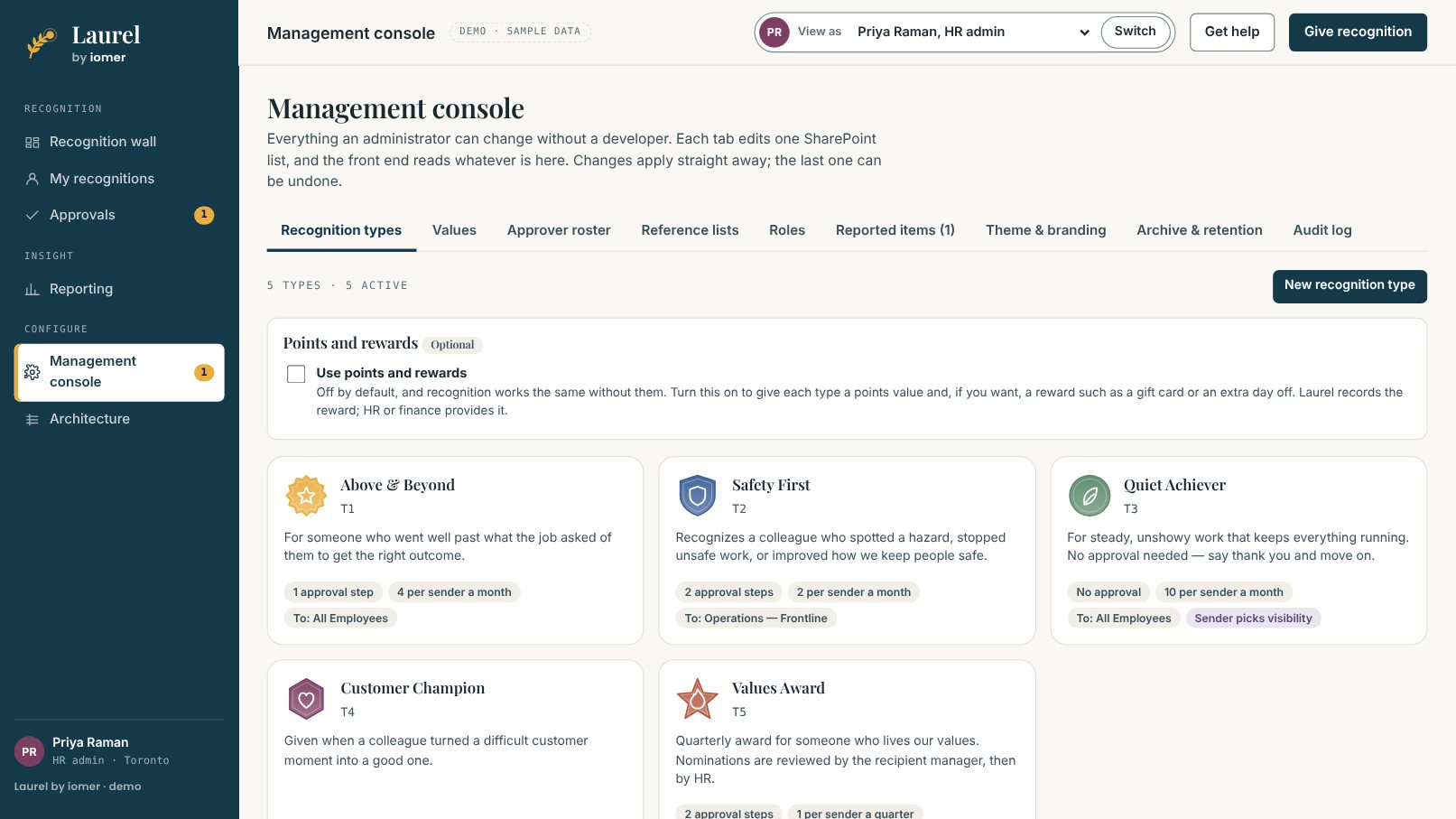
The management console holds every rule of your program on tabs your HR admins can change without IT or a release: recognition types, values, the approver roster, roles, reported items, theme, archive and retention, and the audit log.
A values award, start to finish
Nominations that follow your rules, every time
Most programs fall down on the formal awards: nominations arrive by email from anyone, HR chases managers for their view, and nobody can show afterwards who approved what. In Laurel an award is a recognition type with its own route.
- Only the right people can nominate
A Values Award might be sent only by managers; employees don’t see it in the form.
- The recipient’s manager supports it
Step one goes to the manager in Entra ID, after a check.
- The HR panel decides
Step two goes to the HR panel on the approver roster. Nobody approves a recognition they’re named in.
- Within the cap
An organization-wide cap, such as eight a quarter, and every decision in the audit log.
Is it working?
Answer with your own data
Reporting covers the whole organization for HR, and each manager’s reporting line for them. Group by type, value, department, location, recipient, sender, manager or month, filter by date, include or leave out archived items and leavers, and export to CSV.
Participation
How many people have been recognized, and by whom, by team and location.
Fairness
Whether recognition reaches every site and team, and who hasn’t been recognized in 90 days.
Values
Which of your organization’s values people are being thanked for.
Private recognition is counted where the viewer can see it, and its message stays out of reports. Indexed columns let you connect Power BI to the recognitions list if you want your own dashboards.
Who Laurel is built for
Organizations that want recognition to be a program
Laurel suits organizations of roughly 200 to 5,000 people on Microsoft 365, with SharePoint and Teams in daily use, that want recognition to be visible and fair, and have someone who will own the program.
It isn’t a rewards marketplace. If you need a gift-card catalogue, points redemption or a payroll link out of the box, a dedicated rewards platform is the better fit, and we’ll say so.
Multi-site employers
Several locations, shifts and a frontline workforce.
Public sector and not-for-profits
Fair, visible recognition, with staff data kept in the tenant.
Health, education and utilities
Safety and values awards with the right approvers.
Professional services
Client and colleague thanks that leadership can see.
Privacy, retention and leavers
Decided once, with your privacy and records staff
Recognition is personal data, and some of it is sensitive. Laurel gives you the settings to handle it the way your policies say, and records what was done.
- Types can be public, private or the sender’s choice, and each person decides whether new recognition about them goes on the wall
- Private items are shown only to the people named, the recipient’s manager, approvers on the route and administrators
- Recognition leaves the wall after a set window and is kept for a set number of years
- Five rules for leavers, from keeping them on the wall as a former colleague to removing their recognition entirely
- Erase on request for a data-subject request, with the reason and request reference in the audit log
- Anyone can report a recognition; your recognition team keeps it, rewords it or takes it down, with a reply
Points and rewards
Optional, and off until you want them
Most of the value of recognition comes from being noticed, and most organizations start without points. If you want them, an admin turns them on: each type can carry points and a reward such as a gift card or an extra day off, with a quarterly points budget, and the audit log gives finance a record.
Laurel records the reward; HR or finance provides it through your own process. There’s no rewards catalogue or payroll link. If that’s what you need, a dedicated rewards platform is the better fit.
No two organizations are the same
Your program and your rules. A tested foundation underneath.
Already built
Works the same way every time
- Checks before anything is published, approved, removed or erased
- Nobody approves recognition they sent or received
- The last change in the console can be undone
- An audit log of every change and decision
Designed and tested before your project starts, so you can rely on it from the first recognition.
Built for you
The way your organization recognizes people
- Your awards, types, badges and values
- Your approvers: safety leads, HR panels, the manager chain
- Your privacy, retention and leaver rules
- Your intranet’s look
Set up in your package by iomer, so Laurel follows your program rather than asking you to change it.
Examples
What it looks like in a working week
Set in Corvane Logistics, an illustrative distribution company of about 1,500 people in five locations. Names and figures come from the demo’s sample data.
ExampleFrom an emailed nomination form to a values award with rules
The head of people wants the quarterly values award to be fair: only managers can nominate, the recipient's manager supports it, an HR panel decides, and no more than eight are given a quarter.
Without Laurel
Today nominations arrive by email from anyone. HR keeps a spreadsheet, chases managers for their view, and can't show afterwards who approved each award.
With Laurel
Values Award is a recognition type: only managers can send it, the route goes to the recipient's manager and then the HR Panel on the approver roster, and the organization-wide cap is eight a quarter. Employees don't see it in Give recognition. Every decision is in the audit log.
The award runs to rules HR set once, and every nomination has a visible, recorded route.
ExampleAnswering whether it's working
Six months after launch, the executive team asks whether recognition is reaching every part of the company.
Without Laurel
With email and a vendor platform nobody opens, there's nothing to answer with except anecdotes.
With Laurel
Reporting covers the whole organization for HR. They group by department, location, type and month, include or exclude archived items and leavers, and export to CSV. Managers' My team pages show who hasn't been recognized in 90 days, so HR can ask the right managers.
HR can answer with participation and fairness figures from the organization's own data, without inventing a metric.
ExampleA recognition someone reported
A safety officer reports a Quiet Achiever on the wall because it mentions a colleague's personal circumstances.
Without Laurel
Today the complaint arrives by email, someone asks IT to delete the post, and nobody records what happened or tells the people involved.
With Laurel
Reported items in the console shows the report with its reason and what has happened to the recognition since. The program owner keeps it, changes the wording or takes it off the wall, with a reply the reporter sees under My recognitions. Both people named are told, and the sender isn't told who reported it. A report about a recognition an administrator sent or received goes to another administrator.
Problems on the wall are handled in one place, with a reason, a reply and a record.
ExampleA new award, without a release
The company launches a Customer Champion award for customer care and operations, up to three a month per sender, approved by the recipient's manager.
Without Laurel
On a vendor platform it's a support ticket; on a homegrown list it's a change request to IT.
With Laurel
The program owner adds the type in the console: name, description, badge shape and colour, who can send it, who can receive it (by group or department), the approval route and the allowance. Laurel checks each field, asks before closing with unsaved changes, and the Saved bar offers Undo. It's live for the next person who opens Give recognition.
HR changes the program without waiting for IT or a vendor.
See your program in Laurel
Watch the 50-second tour, or book a walkthrough and we’ll show Laurel set up with awards and approval routes like yours, from the give form to the report you’d show leadership.