
Knowledge centre for Microsoft 365
Knowledge Centre for SharePoint
A knowledge centre for Microsoft 365, with search staff actually use, staged approvals, version history and read confirmations. Built for operations and contact-centre teams in regulated organizations.
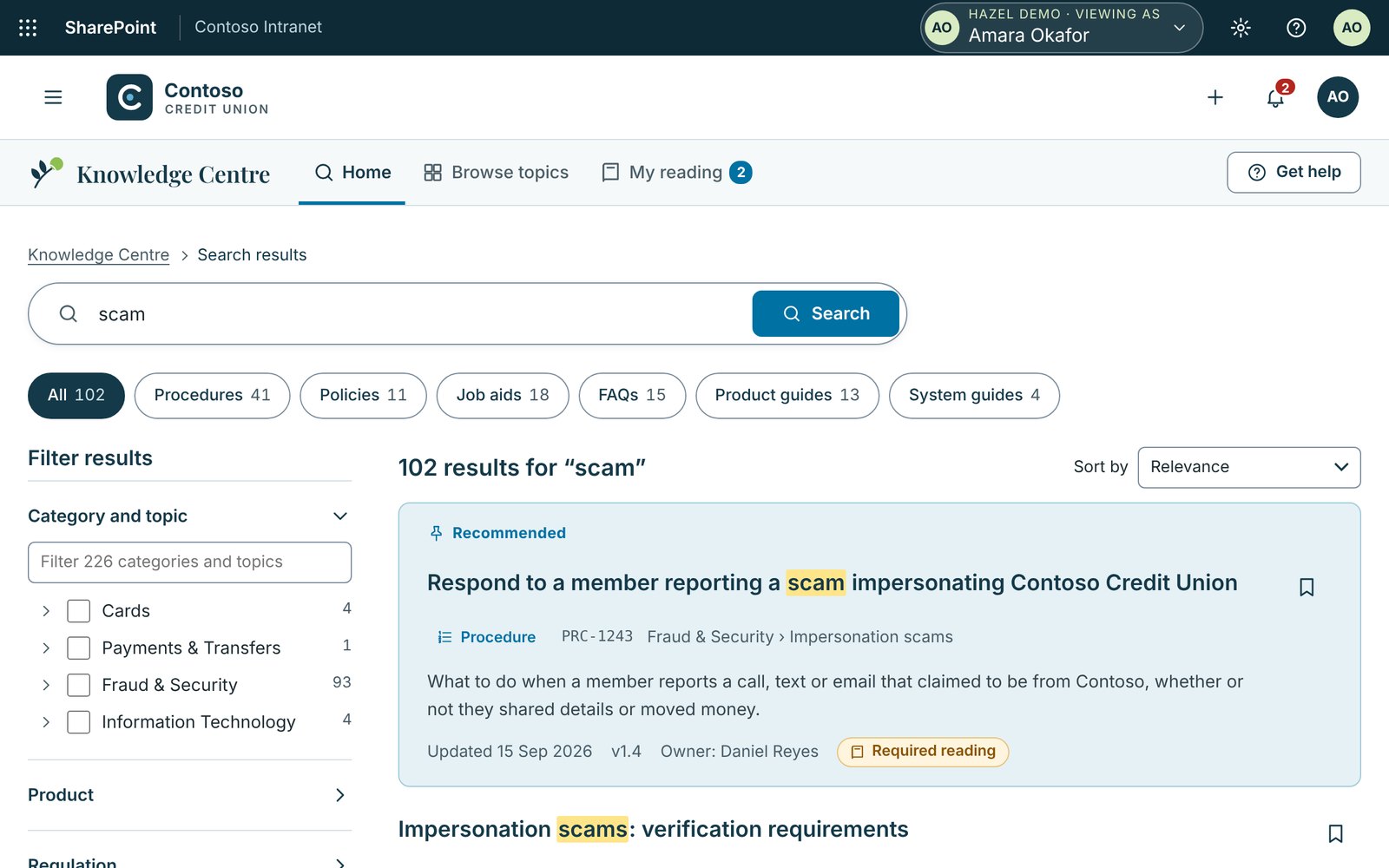
- 1The right procedure first
- 2Filter by procedure, policy, job aid and more
- 3Version, owner and required reading on every result
From the Hazel demo, with sample data.
- Runs in your Microsoft 365 tenant
- Built for you, installed with IT
- From iomer, building on SharePoint since 2000
Why it matters
The procedure exists. But can staff find it?
Most organizations already have the procedures they need. They sit in Word files across libraries and drives, versions disagree, and staff ask a colleague instead of searching. When the answer can’t be found, someone stops their work to help, or a member gets a guess.
of digital workers struggle to find the information they need to do their jobs effectively.
Gartner survey of 4,861 digital workers, published 2023. The survey covers general workforces.Ready for AI
Copilot answers from what it finds. Hazel makes sure it finds the right thing.
AI answers questions from whatever content it can reach, current or not, approved or not. Hazel gives every procedure one approved, current version with an owner and a review date, so the content your AI reads is content you’d stand behind.
AI answers in Hazel are optional and off by default. With Microsoft 365 Copilot, they quote only published content the person can already open, and cite the section.
How Hazel works with Copilotof AI projects unsupported by AI-ready data will be abandoned through 2026.
Gartner, February 2025What changes with Hazel
From scattered files to one source people trust
Hazel keeps your content on SharePoint and adds the search, lifecycle and records around it.
Three things Hazel does well
Find it fast. Trust what you find.
Find it fast
Search is built for the way staff ask. Suggestions appear as people type. Synonyms mean “vishing” finds the phone-scam procedure. Recommended results are pinned for common questions, and a match jumps straight to the right section of a long procedure.
Trust what you find
Every article follows a content type with its own template, approval route and review cycle. Approvals run in stages with due dates and separation of duties. Staff keep seeing the approved version while a new draft is in review.
It’s already yours
Hazel is built on SharePoint, not another platform, and iomer installs it in your tenant with your IT team. Articles stay there under your own security, retention and data residency settings. People sign in with the Microsoft 365 accounts they already use, and Hazel sits inside your intranet.
No two organizations are the same
Off-the-shelf speed. Custom-built fit.
Hazel is a solution accelerator, so the work is split in two. The parts every organization needs are already built, so you don’t pay to build them again. The parts that make your organization different are built into your own installation package by iomer, and installed in your tenant.
Already built
The same for every organization
- Search with synonyms, recommended results and section matching
- Staged approvals with separation of duties
- Version history and “which version was in effect on this date”
Built for you
Different for every organization
- Your content types, sections and Word templates
- Your approval routes, approvers and committees
- Your taxonomy of topics, services, regulations and synonyms
Download the datasheet (PDF, 2 pages)Compare with off-the-shelf and custom builds See every feature
Go live in five steps
From Word files to your own knowledge centre
- Plan
Map your content, content types and approval routes with us.
- Build
We build Hazel for your organization as a single installation package.
- Install
We install it in your tenant and test it there with your IT team.
- Migrate
We bring your Word procedures across in batches.
- Launch
Training for authors and admins, and a launch plan for staff.
As your needs change, iomer builds and installs a new version of your package, so changes reach your tenant the same tested way.
Part of iomer Solution Accelerators for SharePoint. See all the accelerators
See Hazel with a procedure like one of yours
Book a 30-minute walkthrough set up with a procedure like one of yours, or take the evaluation kit away and come back when you’re ready.