
For managers and staff
Everyone knows what they owe, and managers chase nothing by hand
Beacon is policy management and attestation for SharePoint that iomer builds for your organization and installs in your tenant. Staff see what’s due and sign in one flow. Managers see who’s overdue and remind them in one click.
What changes for managers and staff
Easy to sign. Hard to miss.
One list of what’s owed
Every policy assigned to you, with its due date and status, and a banner when something is overdue.
Sign in one flow
Read the page or the document, see what changed, ask the owner if you’re unsure, and sign with your name.
Overdue reaches the manager
Each overdue item shows on the manager’s team view with how late it is, and a reminder is one click away.
Certifications kept current
People renew their own certificates with the evidence attached, and managers verify them.
The manager’s view
Your team, from the manager field in Microsoft 365
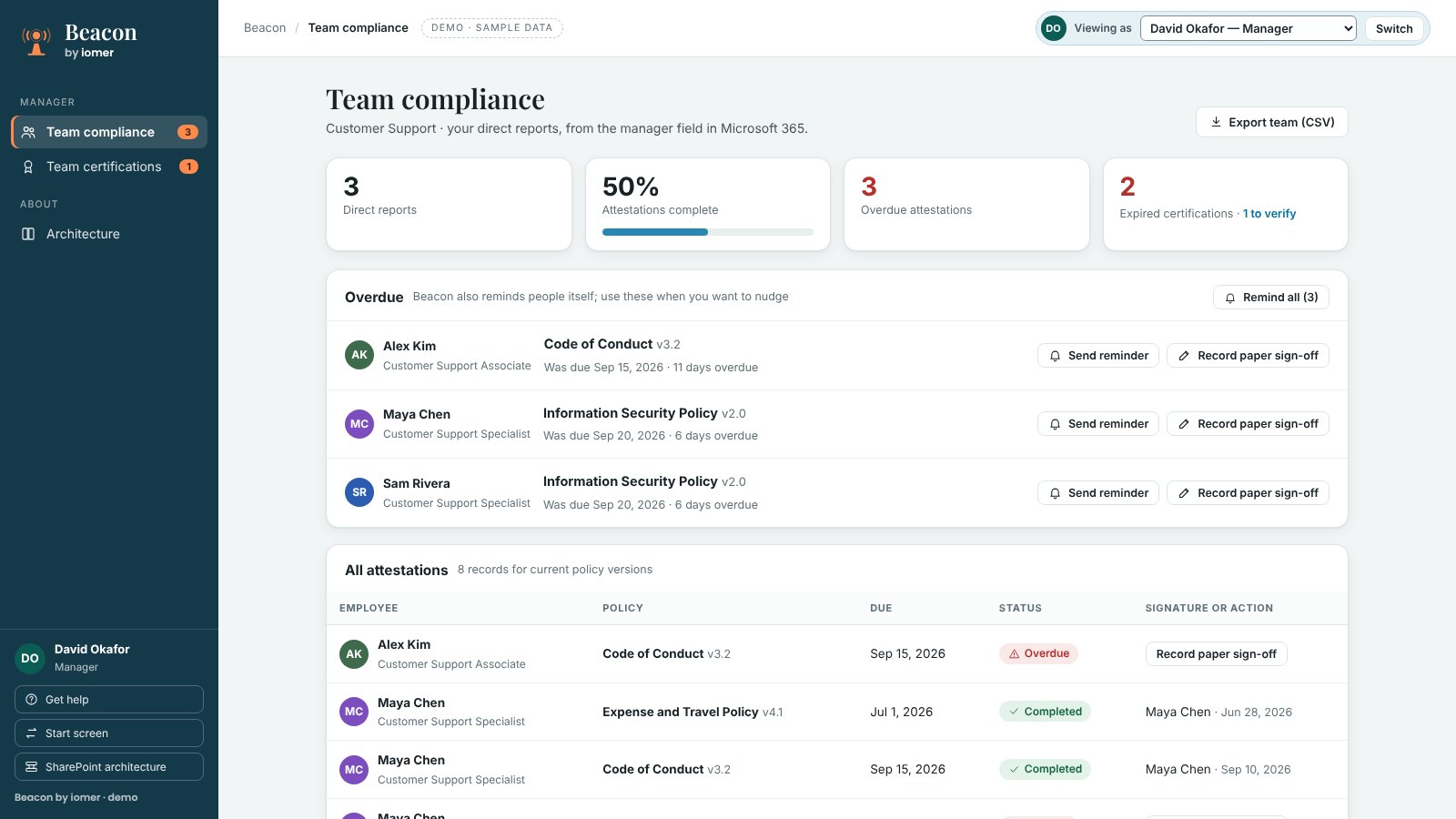
Team compliance lists your direct reports’ sign-offs for current policy versions. Beacon reminds people itself; your reminders are for when you want to nudge.
Examples
What it looks like in a working week
Set in an example insurer of about 1,200 staff. Names and figures are illustrative.
ExampleThree people overdue, one click to chase
A contact-centre team lead has three people overdue: one on the code of conduct, two on the information security policy.
Without Beacon
She finds out when HR forwards a spreadsheet two days before an audit. She writes three separate emails and still can't tell who has signed since.
With Beacon
Team compliance shows the overdue list, sourced from the manager field in Microsoft 365: each person, the policy and version, and how many days late. She sends a reminder to one person, or uses Remind all. Beacon also reminds people itself, so her reminders are for when she wants to nudge.
Managers see who is overdue without waiting for HR, and chasing takes one click instead of a round of emails.
ExampleA lapsed safety certificate and a paper sign-off
A claims manager has a field adjuster whose workplace safety training expired last month, and a warehouse temp who signed the code of conduct on paper because he has no Microsoft 365 account.
Without Beacon
The expired certificate sits in a spreadsheet nobody opened this quarter. The paper form goes in a drawer and never reaches the record.
With Beacon
Team certifications shows the expired certificate and anything waiting for verification. The adjuster uploads his renewal from My certifications, and the manager reviews the evidence and verifies it. For the temp, the manager uses Record paper sign-off, which adds a signature to the record marked as a paper form recorded by the manager.
Expired certifications reach the manager who can fix them, and people without a device still end up in the record.
ExampleAn overdue sign-off, found before the audit
A field claims adjuster has been on the road for three weeks. The updated information security policy was due for sign-off ten days ago, and the annual code of conduct sign-off opens this month.
Without Beacon
The announcement went to his inbox with 400 other messages. Nobody tells him he's overdue until the audit, when HR finds his name missing from the spreadsheet and his manager has to chase him by phone.
With Beacon
My policies shows the information security policy marked Overdue with a red banner and a count in the navigation, and the code of conduct as Not started with its due date. He opens the policy, reads it, types his full name and submits. The signature is recorded against that version with the date, and his manager's view updates.
Staff see what they owe and when it's due in one place, and an overdue sign-off is visible to the person and their manager before anyone has to go looking for it.
ExampleA manager on leave in the middle of a sign-off cycle
The annual code of conduct cycle opens while a claims manager is on six weeks of leave. Her 14 adjusters still need to sign, and two certificates are waiting to be verified.
Without Beacon
Nobody owns the team's sign-offs while she's away. The cycle closes with gaps, and the certificates wait until she's back.
With Beacon
Before she leaves, the manager uses Cover while you're away to name the HR business partner. The HR business partner sees the team's status, sends reminders and verifies the certificates, and each decision is logged under their own name. Cover ends automatically on the date she chose.
Sign-offs and verifications keep moving when a manager is away, and the record shows who acted.
See it the way your staff and managers would
Watch the 45-second tour of a signature, a reminder and a new version, or book a walkthrough with policies like yours.