
Employee onboarding for Microsoft 365
Employee Onboarding for SharePoint
Journey gives each new hire a clear path through their first 90 days, shows managers who’s behind, and gets HR, IT and safety working from the same plan. Built for organizations where onboarding crosses departments and locations.
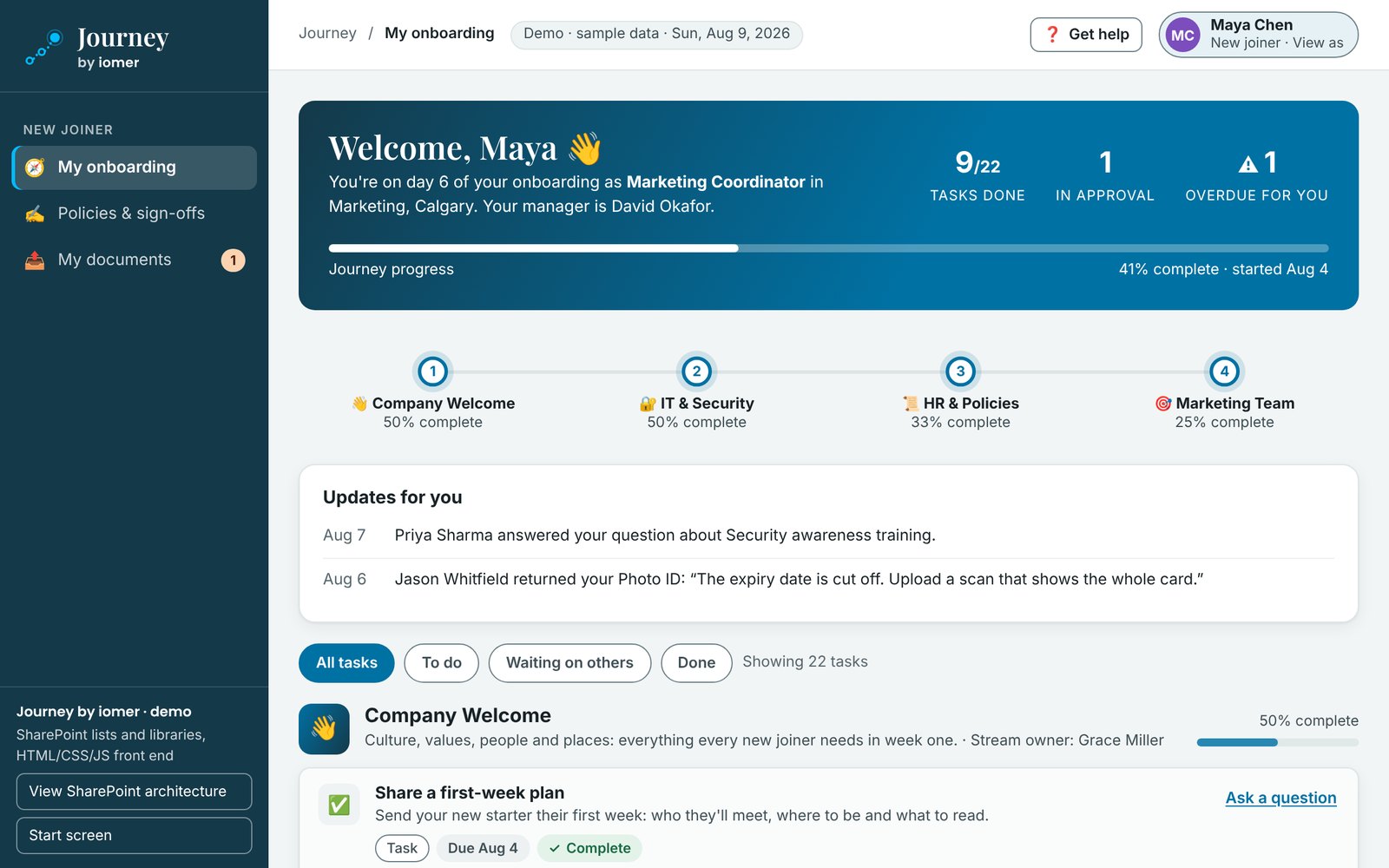
- 1Progress, approvals and anything overdue
- 2Every stream in one journey
- 3Updates from the people helping them
- Runs in your Microsoft 365 tenant
- Built for you, installed with IT
- From iomer, building on SharePoint since 2000
Why it matters
The first weeks shape whether people stay
A new hire’s first weeks shape how quickly they contribute and how long they stay. Yet much onboarding still runs on email threads, spreadsheets and a checklist nobody owns. Managers can’t see who’s stuck, IT and safety keep their own lists, and nobody can say what’s left before a new hire is ready to work on their own.
of employees strongly agree their organization does a great job of onboarding new employees.
Gallup, 2018What changes with Journey
From email and spreadsheets to one plan
Journey brings every team’s part of onboarding into one plan for each new hire, on the Microsoft 365 you already run.
Three things Journey does well
One journey for everyone. Assigned by rule from day one.
One journey for everyone involved
The new hire, their manager, the teams who own each part of onboarding and HR each get a view built for them. Each task says who it’s waiting on, so nobody chases status by email.
Built once, assigned by rule
HR builds each stream once: welcome, IT, safety, HR, facilities and each department. Rules read each person’s Entra ID profile and Microsoft 365 groups and add the right streams to their journey when they join, with every due date counted from their start date. Approvals along the way, such as access or competency, go to their manager from Entra ID. For policies everyone signs again year after year, see Beacon.
Private to each new hire
A new hire’s photo ID and tax forms go into their own folder, which only they, their manager and HR can open. Task records are visible only to the new hire, their manager and the stream owners. It all stays in your Microsoft 365 tenant, installed by iomer with your IT team, and a standard deployment needs no extra Microsoft licences.
No two organizations are the same
Off-the-shelf speed. Custom-built fit.
Journey is a solution accelerator, so the work is split in two. The engine every onboarding program needs, from streams and assignment rules to each manager’s team view, is already built, so you don’t pay to build it again. Your teams, streams and approval routes are built into your own deployment package by iomer and installed in your tenant.
Already built
The same for every organization
- Streams and task collections, with due dates counted from each person’s start date
- Automatic assignment from Microsoft 365 groups and Entra ID profiles
- A view for the new hire, their manager, each stream owner and HR
Built for you
Different for every organization
- Your streams: welcome, IT, safety, HR, facilities and each department
- Your tasks, forms to collect and policies to acknowledge
- Your rules for who gets which stream, and your approval routes
Download the datasheet (PDF, 2 pages)Compare with off-the-shelf and custom builds See every feature
Go live in five steps
From checklists and inboxes to one onboarding plan
- Plan
Map your onboarding to day 90 with us: the teams, streams, tasks and approvals.
- Build
Your checklists become task collections, and your streams and rules go into one deployment package.
- Install
We install it in your tenant with your IT team and connect it to your Entra ID managers and groups.
- Pilot
We run it with a group of real new hires and adjust before launch.
- Launch
Training for administrators, stream owners and managers, then rules switched on so every new hire gets a journey.
When you add a team, a location or a stream, iomer builds and installs a new version of your package, tested the same way.
Part of iomer Solution Accelerators for SharePoint. See all the accelerators
See Journey with onboarding like yours
Book a 30-minute walkthrough in your own brand colours, or take the evaluation kit away and come back when you’re ready.