
For HR and People Ops
Design onboarding once, and see it run everywhere
Journey turns your onboarding process into streams that rules assign, managers follow and every team can see. Acknowledgements, approvals and documents are on record as people work, so the answer to “did they complete it?” is already there.
What changes for HR
Less chasing, one plan, a better first 90 days
Built once
Streams and task collections with due days, task types and approval routes. Change the process once, not in every copied checklist.
Assigned by rule
Journeys created from Microsoft 365 groups and Entra ID profiles, waiting on day one. Group assignment names anyone left out first.
Paperwork in one place
Forms land in a private folder per new hire. Accept each one, or return it with a reason they can act on.
Reports in two clicks
Completion by stream, manager, department, location and start date, with policies acknowledged. Export to CSV or Power BI.
Structure and a manager who can see matter most
as likely to say onboarding was a success when their manager took an active role.
Gallup, 2021of new hires say they feel fully prepared and supported to excel in their role.
Gallup, 2021is roughly how long employers have to influence a new hire’s long-term retention.
BambooHR, 2023Sources: Gallup, “Why the Onboarding Experience Is Key for Retention” (2018); Gallup, “Create an Exceptional Onboarding Journey for Your New Employees” (2021); BambooHR, “2023 Onboarding Statistics”, a survey of 1,565 US workers. The surveys cover general workforces.
The People Ops view
The report your leadership team asks for
Journeys in scope, tasks complete, overdue, awaiting approval and policies acknowledged, with completion by stream and by person. Filter by stream, manager, department, location or start date, then export to CSV.
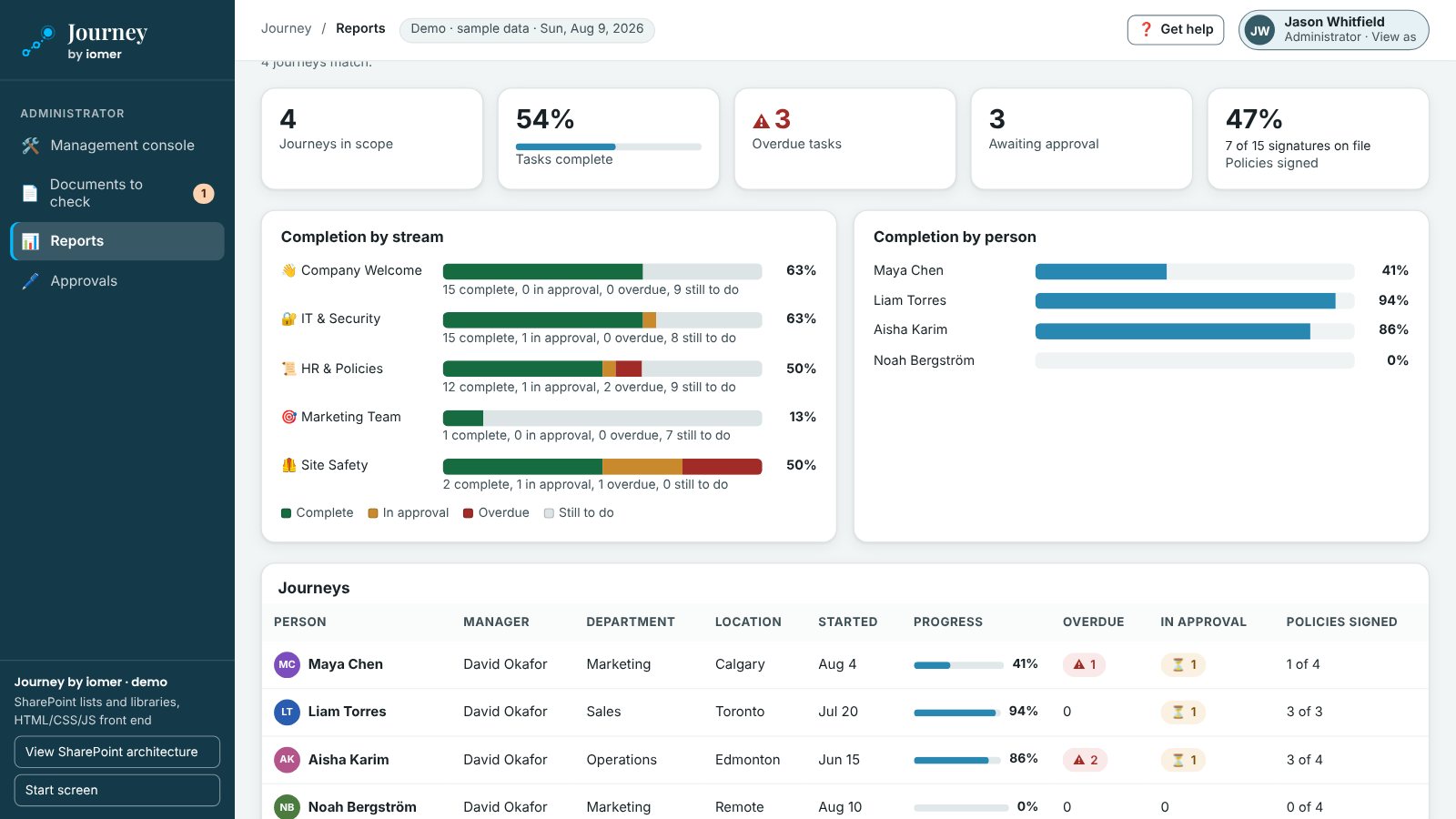
When the safety audit comes
“Show me which new field workers completed orientation and competency sign-off.”
Safety certification audits ask it, and so do the managers who need to know who can work unsupervised. Without one plan, HR and safety rebuild the answer from personnel files, a district binder and someone’s inbox. With Journey it takes four steps.
- Open the stream
Open Site Safety, or filter reports by location and start date.
- See who’s done
Each new worker against each task: complete, in progress, awaiting approval or overdue.
- Check the sign-offs
Each competency sign-off with both approval levels, their dates and comments.
- Export the report
Export to CSV, or export the audit log, which can’t be edited.
Who Journey is built for
Organizations where onboarding crosses teams and has to be shown
Typically 200 to 5,000 staff on Microsoft 365, hiring steadily, with three or more teams involved in each person’s first weeks.
Energy and utilities
Field crews with safety orientation, PPE and competency sign-off, assigned by location and job role.
Construction and field services
Site safety tasks and paper acknowledgements recorded for people who work without a laptop.
Municipalities and the public sector
Consistent onboarding across departments, with an accessible experience that works by keyboard.
Healthcare
Policies acknowledged by version and approvals for access, across sites and departments.
Financial services
Code of conduct and acceptable-use acknowledgements for every new hire, with the record kept in your tenant.
Higher education
Faculty and staff intakes in waves, assigned by group, with each department’s stream.
No two onboarding programs are the same
Your onboarding, your routes. The controls are already built in.
Already built
Controls that work the same way every time
- Task records visible only to the new hire, their manager and stream owners
- A private folder per new hire for uploaded documents
- No self-approval, one level per person, and a comment required to return an item
- Actions taken for someone else on the record, and an audit log that can’t be edited
Designed before your project starts, so you can rely on them from the first new hire.
Built for you
The way your onboarding actually runs
- Your streams, tasks and due days
- Your policies, forms and approval routes
- Your rules, departments, locations and roles
Built into your package by iomer, so Journey follows your process rather than asking you to change it.
Alongside what you have
Your HR system, your intranet, your policies
Your HR system. It does the HR part of onboarding well: offer letters, tax forms, payroll and the employee record. Journey is the work side, getting IT, safety, facilities and the hiring manager working from the same plan. A new-hire event or group membership can start the journey automatically.
Your intranet. Journey lives on its own SharePoint site and takes your site theme. Tasks link to the pages and documents you already have, so welcome content isn’t copied.
Policies after onboarding. Journey covers the policies a new hire acknowledges in their first weeks. Signing every policy again year after year, with review dates and certifications, is what iomer’s Beacon does.
A typed-name acknowledgement records who acknowledged which version and when. It isn’t proof that someone understood the policy, which is why new hires can ask the owner a question before they acknowledge it. Journey supports your safety and compliance program; it doesn’t make an organization compliant on its own.
Download the datasheet (PDF, 2 pages)
Show us how onboarding runs today
Watch the 40-second tour, or book a walkthrough and we’ll map your streams and show where each record comes from.