
For internal communications
One news centre for the whole organization, on brand and up to date
Chronicle gives your communications team one place to run the organization’s news: templates and a news brand every author starts from, approval routes that reach the right people, featuring for what matters this week, and archive rules that give every story a date to come down. All inside your own Microsoft 365.
What changes for communications
Set the brand and the routes once. Authors just write.
Templates and a news brand
Twelve templates, the layouts your team saves and one news brand, so every story looks like it came from the same place.
The right approvers
Routing rules send each story to the author’s manager, a department or topic lead, a campaign owner or your team, in order.
What readers see first
Feature the stories that matter, with an end date, and choose one of seven layouts for the top of the news centre.
News that comes down
Archive and delete dates for every story, set by rules you choose, with holds where you need them.
The news owner’s view
Run the news, not an inbox
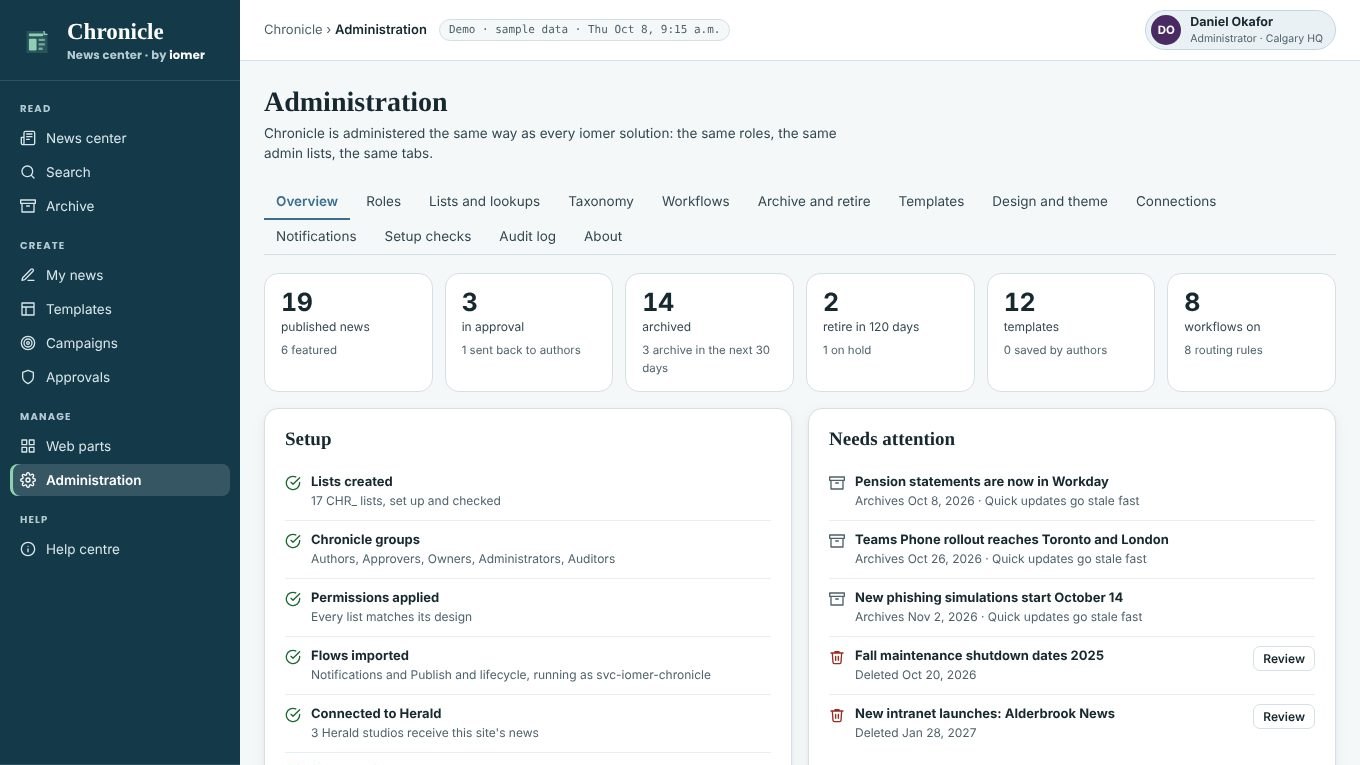
Administration holds every setting your team needs, on tabs your owners and administrators change without IT or a release: roles, topics and their leads, workflows and routing, archive and retire, templates, the news brand, campaigns and the audit log.
A story’s route, start to finish
Every story reaches the right approvers, every time
Most news teams chase approvals by email: who needs to see a story, who has, and which version they saw. In Chronicle a routing rule picks the workflow, and the author sees the route before submitting.
- A rule picks the route
Benefits news goes to the Benefits topic lead, then a site approver. The first rule that matches wins.
- The author sees it first
Before submitting, the designer shows each step and who will approve it.
- Approvers edit, visibly
The topic lead can edit the draft, and every change is marked word by word against what the author sent.
- On the record
Each decision, comment and publish goes into the story’s history and the audit log.
Who Chronicle is built for
Organizations where news comes from many places
Typically 500 to 10,000 staff on Microsoft 365, with news coming from several departments and locations, and a small communications team responsible for what goes out.
Manufacturing and industry
Mills, plants and warehouses, with news that reaches every site and shift from one news centre.
Energy and utilities
Safety news approved by the people who own safety before it reaches field crews.
Municipalities and the public sector
Many departments and one voice, with a record of what was published and when.
Healthcare
News from sites and departments, checked by the right leads before it goes out.
Financial services
Approved news for branches and head office, with archive rules your records staff agree.
Higher education
Faculties and departments writing their own news, under one brand.
No two organizations are the same
Your news, your brand, your routes. A tested foundation underneath.
Already built
Works the same way every time
- A checklist before every story goes for approval
- Every approver’s change marked against the original
- Approval routes picked by rules, not by memory
- Every change and decision in the audit log
Designed and tested before your project starts, so you can rely on it from the first story.
Built for you
The way your organization tells its news
- Your news brand, colours and headline font
- Your templates, topics, departments, series and their leads
- Your approval routes and routing rules
- Your archive and retire rules
Set up in your package by iomer, so Chronicle follows how your organization already works rather than asking you to change it.
Alongside what you have
Your intranet, your SharePoint news, your newsletters
Your intranet. Chronicle lives on your news site. Its twelve news web parts put the news on your intranet home page and department sites, each linking back to the news centre, so stories aren’t copied from site to site.
SharePoint news. Every Chronicle story is a SharePoint news page, so it still shows in SharePoint news. Chronicle adds the templates, approval routes, featuring and archive dates around it.
Newsletters. Email newsletters are the job of Herald, iomer’s newsletter accelerator. If you use both, authors can suggest a published story to a newsletter, and campaigns can be shared so news and newsletters count toward the same goal.
An approval in Chronicle records who approved which version of a story, when, and what they changed. It doesn’t decide what’s accurate or right to publish; that stays with your approvers, which is why they can edit a draft or send it back. Chronicle supports your communications and records policies; it doesn’t set them.
Download the datasheet (PDF, 2 pages)
See your news in Chronicle
Book a walkthrough and we’ll show Chronicle set up with templates and approval routes like yours, from a draft to the story on your news centre, or take the evaluation kit away for later.