
For managers and staff
Thank people in a minute, and see who’s being missed
Laurel makes it easy for anyone to thank a colleague in public, and gives managers one place to approve recognition, see what their team has received, and notice who hasn’t been thanked in a while. It runs on the intranet and in Teams, with the sign-in people already use.
What changes for managers and staff
Good work seen beyond the person’s own manager
Give in a minute
Pick people, a type and say what they did, with three prompts and a check before it’s sent.
Approve in one place
Recognition routed to you waits under Approvals. Tidy the wording, then approve after a check.
My team
Your direct reports from Entra ID, what each has received, and who hasn’t been recognized in 90 days.
A record for one-to-ones
Everything a person received in a period, with a CSV. They can download the same record themselves.
A manager’s view
Three people nobody has thanked in 90 days
Helen, the chief operating officer, opens My team on her five direct reports. Laurel names the three who haven’t been recognized in 90 days, and she can switch to everyone in her reporting line. Only managers in a person’s reporting line see this.

For everyone
Nothing goes out until you’ve checked it
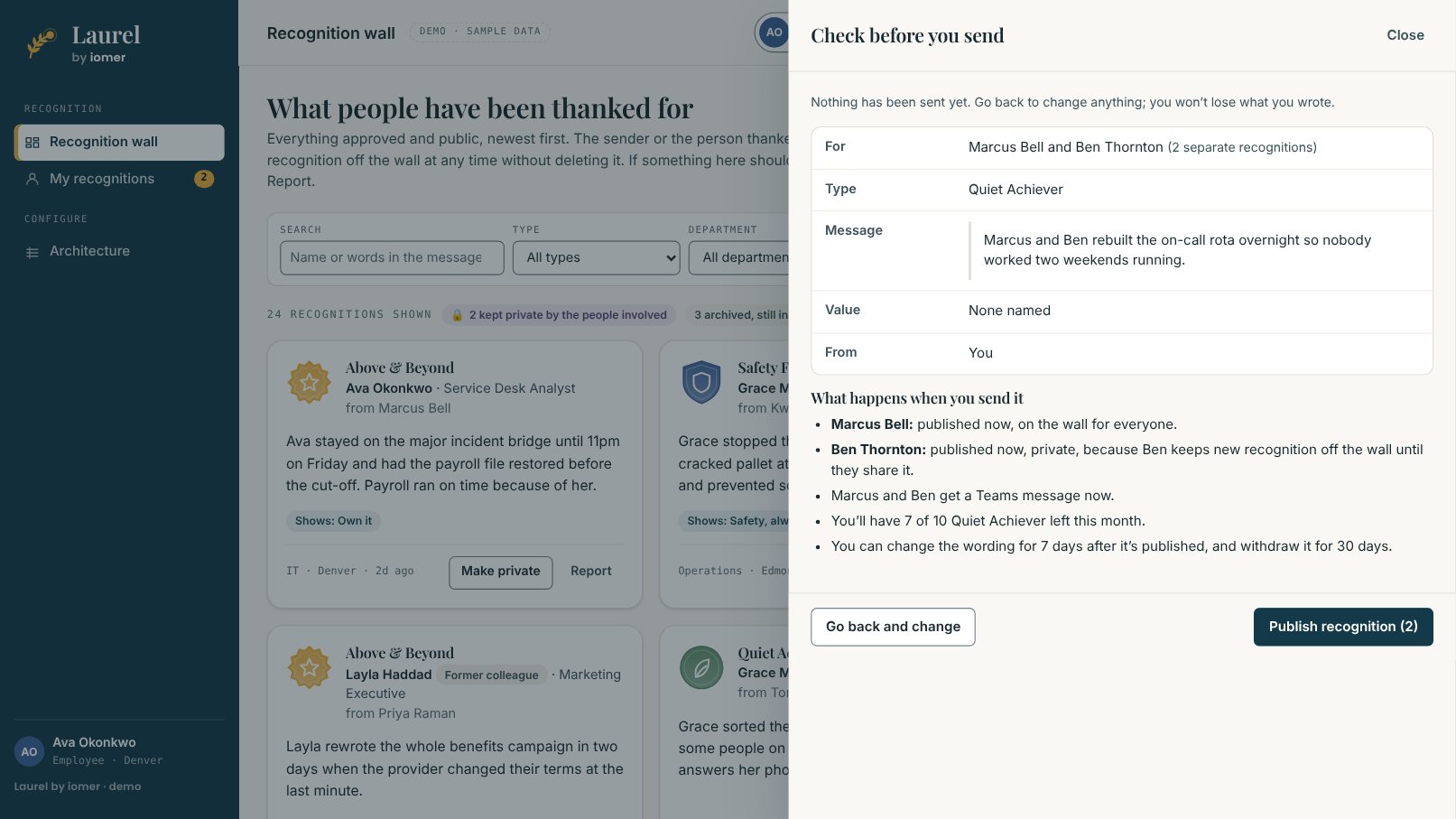
Giving recognition ends with a check that names each person, who will see it, who is told and the allowance left. Here Ben keeps new recognition about him off the wall until he shares it, so his arrives privately while Marcus’s goes on the wall.
Your say over recognition about you
People choose who sees it
Not everyone wants their name on a wall, and some thanks are personal. Every person manages what’s theirs without asking anyone, and when someone acts for them, they’re told who and why.
On the wall, or not
Choose whether new recognition about you goes on the wall or waits until you share it. Take any recognition off the wall without deleting it.
How you’re told
Teams, email or both, and everything under Updates in Laurel.
Change your mind
Senders can change the wording or withdraw what they sent, within limits, and the earlier wording is kept.
No two organizations are the same
Your awards, your approvers. A tested foundation underneath.
Already built
Works the same way every time
- A check before every send, approval and decline
- Declines come with a reason, and Send again keeps the sender’s words
- Managers come from Entra ID, so nobody keeps a list
- Works on phones, through the intranet or a Teams tab
Designed and tested before your project starts, so recognition works from the first day.
Built for you
The way your people thank each other
- Your types, from a quick thank-you to the awards that need approval
- Your values, so a thank-you can name the one it showed
- Your approvers for each kind of recognition
Set up in your package by iomer, so Laurel follows the way your organization already works.
Examples
What it looks like in a working week
Set in Corvane Logistics, an illustrative distribution company of about 1,500 people in five locations. Names and figures come from the demo’s sample data.
ExampleAn approval with a typo in it
An IT service manager gets an Above & Beyond for one of his analysts to approve. The message is warm, but it gets the system name wrong and the analyst would be embarrassed by it.
Without Laurel
Today he'd email the sender to ask them to fix it, or approve it as it is. Either way nothing records who said what.
With Laurel
In Approvals he selects Edit wording, fixes it and saves. The sender is told it was changed, and the card later says the wording was edited during approval; the original is kept for the people named in it and administrators. Approve step 1 opens a check that says what approving will do (here it's published privately, because of the recipient's own setting) before he confirms.
Managers can tidy recognition before it goes live without losing the sender's words, and nothing is published without a check.
ExampleA one-to-one with the record in hand
A manager has a mid-year conversation with an analyst who feels her work on the incident bridge went unnoticed.
Without Laurel
He scrolls through Teams and email to find what she's been thanked for. He finds two messages and misses the rest.
With Laurel
In My team he selects Record for her: everything she received in the chosen period, including private items, with counts by type and value and a CSV to take into the meeting. She can download the same record herself under My recognitions.
Managers and their people walk into a one-to-one with the same record of what's been recognized.
ExampleThe three people nobody has thanked
A chief operating officer with five direct reports and a reporting line of fourteen opens Laurel before her monthly leadership meeting.
Without Laurel
She has no way to know who in her organization is being missed. Her managers say recognition is happening; the engagement survey says it isn't.
With Laurel
My team opens on her five direct reports and names the three who haven't been recognized in 90 days. Under Show she switches to everyone in her reporting line. Only managers in a person's reporting line see this, and private recognition for people further down stays with their own manager, so the page says it isn't counted for her.
Leaders see who is being missed while there's still time to do something about it.
ExampleA safety catch the whole company hears about
A warehouse operative in Edmonton stops the line when she spots a cracked pallet at height. It costs twenty minutes and prevents something much worse.
Without Laurel
Her supervisor thanks her on the floor. The story goes no further than the shift, and the next safety award is decided months later from whoever someone remembers to nominate.
With Laurel
A colleague gives her a Safety First recognition from his phone. Safety First goes to the site's safety lead and then to her manager, and once approved it appears on the wall with its badge, her name, the message and the value it showed. Anyone in the company can filter the wall by Operations or Edmonton and see it.
Frontline work is seen across the organization, not just on the shift, and safety recognition goes through the people who should approve it.
See what your people would see
Watch the 50-second tour, or book a walkthrough with a manager or two and we’ll show giving, approving and My team with recognition types like yours.