
For authors and approvers
Stop retyping the news. Approve exactly what goes out.
Authors build each issue from stories already on your intranet, and see it the way every reader will before it goes. Approvers read the same issue readers will get, so what they sign off is exactly what’s sent.
What changes for authors and approvers
Issues that go out right, without the copy and paste
Start from a template
Fourteen templates and your team’s saved layouts, with sample text flagged until you replace it.
Pull in what’s published
Search news posts, events, documents and people in the SharePoint tab, or let a live query show the most recent news until you send.
See every channel
Preview the intranet page, the email as Outlook gets it, the PDF and the Teams card, then send yourself a test.
Approve what goes out
Approvers read it as readers will, then approve it or ask for changes. An edit afterwards brings it back to them.
An author’s view
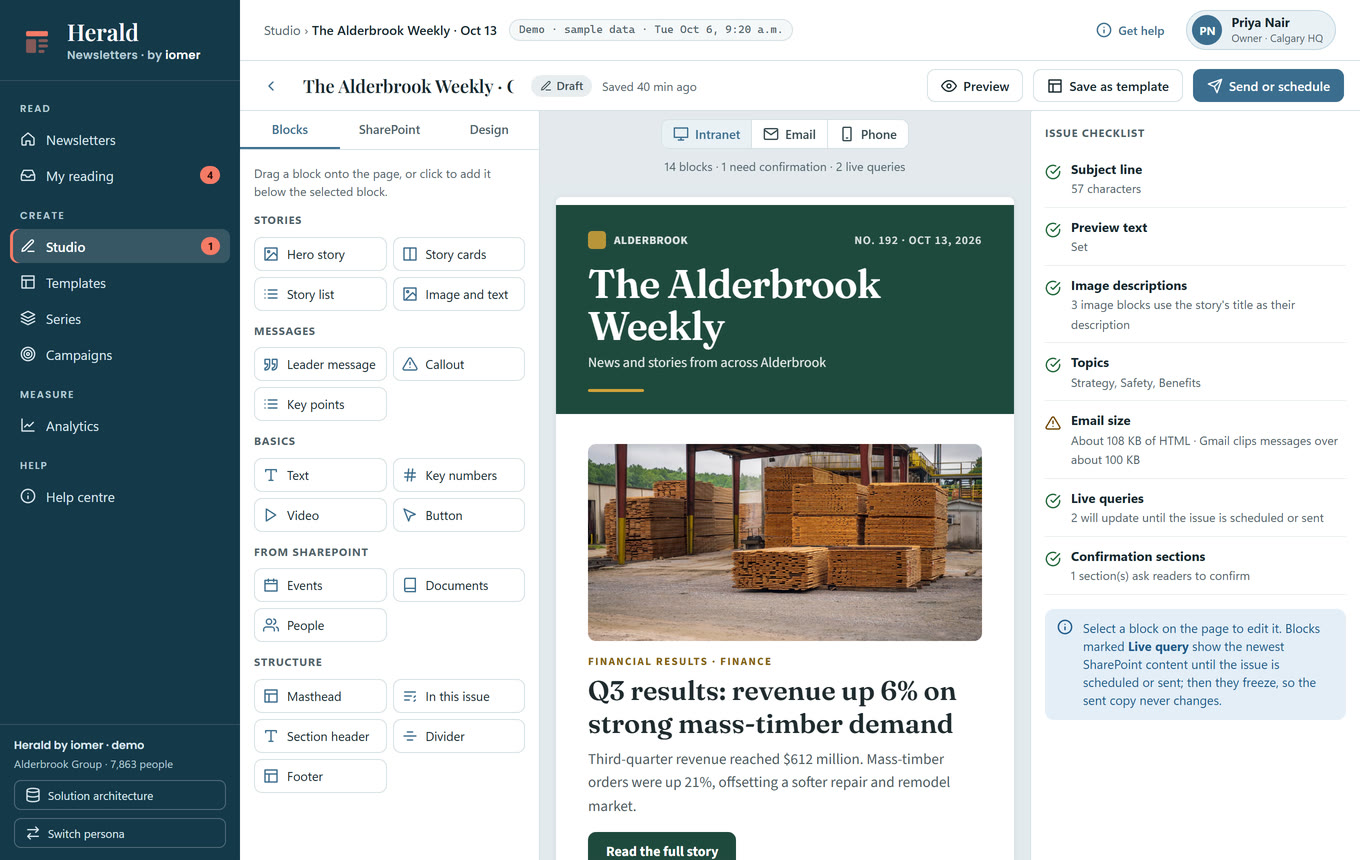
Blocks on the left, a checklist on the right
Priya Nair is building next week’s Alderbrook Weekly. On the left are nineteen kinds of block, from hero stories to events, documents and people, with the SharePoint and Design tabs beside them. The page shows at intranet, email or phone width, Herald saves as Priya types, and the issue checklist on the right shows what’s left before it can go.
For approvers
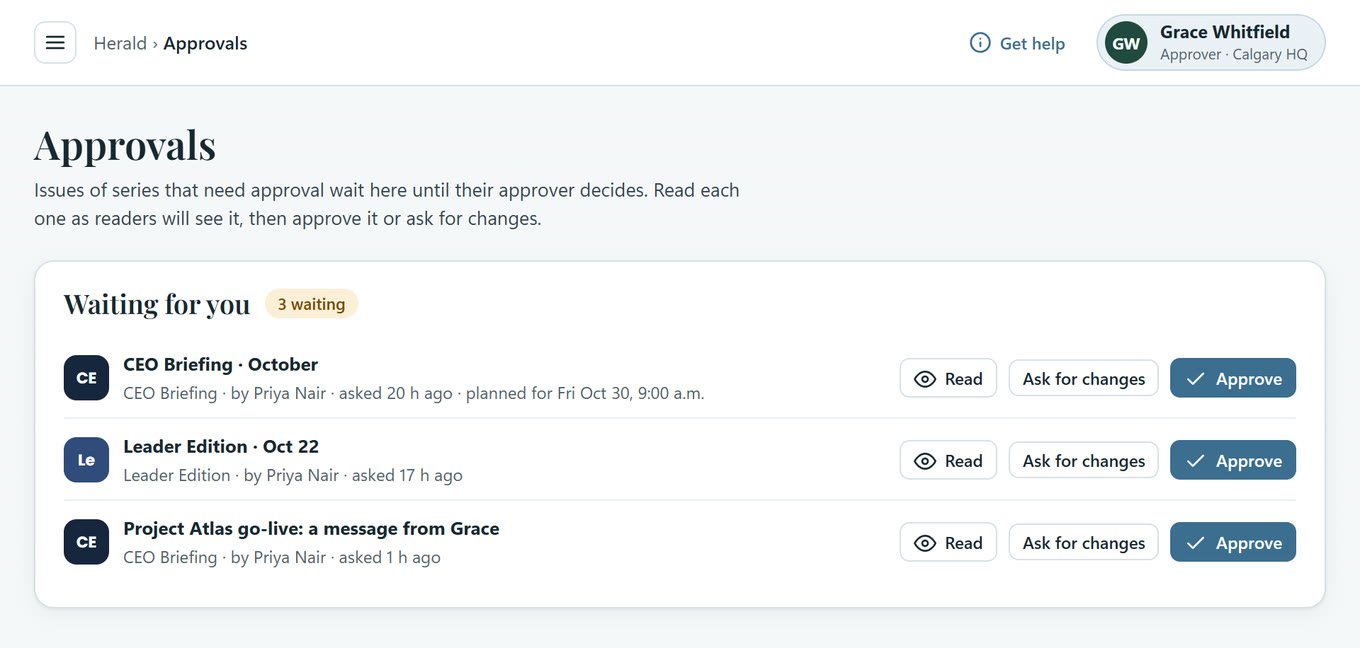
Read it as readers will, then decide
Grace Whitfield, the chief executive, approves the CEO Briefing and the Leader Edition. Issues waiting for approval are under Approvals: Grace selects Read to see the issue exactly as readers will, then Approve, or Ask for changes with a comment the author sees. The approval covers that version only; if it’s edited afterwards, it comes back to Grace. With the messages flow set up, Grace and the author also get an email.
Examples
What it looks like in a working week
Set in Alderbrook Group, a made-up wood products company of about 7,900 people in eight locations. Names, newsletters and figures come from the Herald demo’s sample data.
The Ops Floor Brief, ready for the first shift
Leo Fontaine writes the Ops Floor Brief for every plant. It has to be in Teams and on the boards when the first shift starts at 6:00 a.m. on Monday.
Without Herald
Today Leo would come in early on Monday to email the brief, post it again in Teams and print it for the boards.
With Herald
Leo starts from the Frontline shift brief template in the Ops Floor Brief series, which brings its audience, Plant & field, and its channels: the intranet page, Teams and a PDF. Leo schedules it on Friday for 6:00 a.m. Monday. Scheduling freezes the issue, so what Leo checked is what goes out, and Herald’s send flow publishes it at that time, even if nobody has Herald open.
The brief is in Teams and on the board when the shift starts, and nobody comes in early to send it.
A CEO Briefing approved as it goes out
Priya Nair’s team writes the monthly CEO Briefing, and Grace Whitfield, the CEO, approves every issue.
Without Herald
Today the draft would go back and forth by email, and a late edit could go out that the CEO never saw.
With Herald
The CEO Briefing series needs Grace’s approval. Priya selects Send for approval; Grace opens it under Approvals, selects Read to see it as readers will, and approves it. If anyone edits it afterwards, it goes back to Grace before it can be sent, and every decision is in the audit log.
The CEO approves the exact issue that goes out under their name.
A benefits notice everyone confirms
HR needs every employee to review what changes in their 2027 benefits before enrolment closes on November 20.
Without Herald
Today HR would email the notice, then ask managers whether their people had read it.
With Herald
Marcus Chen builds Benefits 2027: what’s changing and what to do from the Policy notice template. Its Enrollment window: November 2–20 section is set to Readers must confirm they’ve read this, so readers select I have read and understood on the page, or follow the confirm link in the email. On the issue’s results, Remind people who haven’t confirmed emails only the people still missing, in blind copy, and Export confirmation register lists everyone who confirmed.
HR knows who has read the notice, and reminds only the people who need it.
An IT change bulletin for Project Atlas
Aisha Karim, IT’s change manager, needs everyone affected ready for the Atlas ERP cutover on the November 14 weekend.
Without Herald
Today the project team would email its distribution list, which misses new starters, and guess who was ready.
With Herald
Aisha builds Atlas cutover: what to expect November 13–17 from the Change update template, in the IT Change Bulletin series and the Project Atlas campaign. Its What you need to do section asks readers to confirm, and the campaign’s card shows reach and confirmations against the targets Aisha set.
The project team sees how many people are ready, against its own goal.
See what your authors would see
Bring an author and an approver to a 30-minute walkthrough, and we’ll show building, approving and sending with series and audiences like yours.