
For internal communications
Reach everyone your newsletters are for, and know when you haven’t
Your people are spread across offices, plants and the road, and one all-staff email doesn’t reach them all. Herald gives your team one place to run every newsletter, takes each issue to where people actually read, and shows which locations and departments it reached, all inside your own Microsoft 365.
What changes for communications
Set up each series once. Authors just build the issue.
Series and templates
Each series brings its audience, template, theme, channels and approver. Fourteen templates and your team’s saved layouts keep every issue on brand.
Every channel at once
One issue goes out as a SharePoint page, an email from your shared mailbox, a Teams post and a PDF, at the time you choose.
The right audience
Entra groups, offices, departments and named people, with anyone left out, counted before you send.
Results that mean something
Reached, read, clicked and confirmed, by location and department, with groups too small to show merged into one total.
The newsletter owner’s view
See who each issue reached, and where
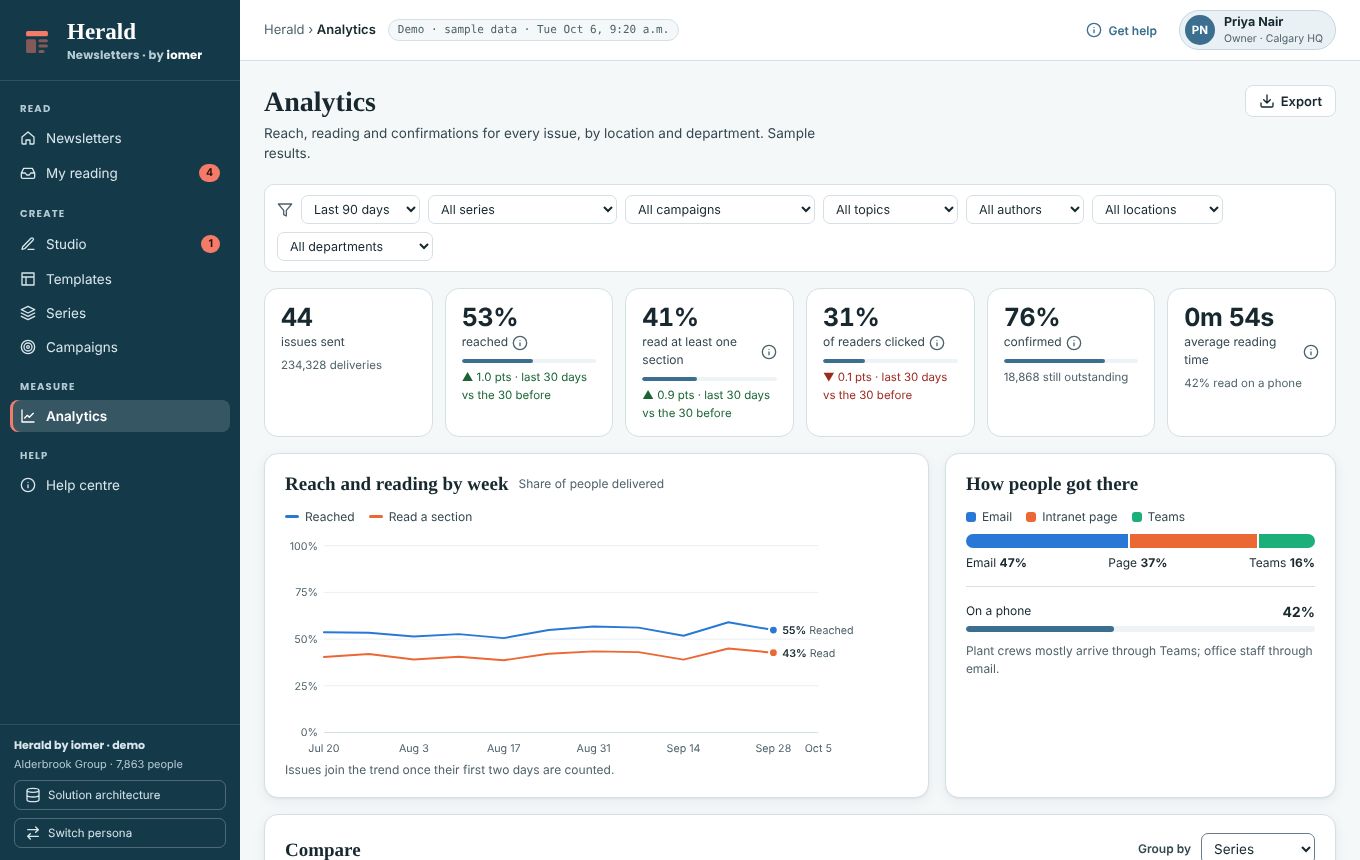
Analytics compares every sent issue. Filter by period, series, campaign, topic, author, location or department, and see reach and reading by week, how people got there and which blocks get read. Reached counts people who opened the issue page; Read means half a section stayed on screen for four seconds. Export downloads the view as CSV.
A series, start to finish
Set up a series once, and every issue follows it
Most newsletter teams keep the audience, the template and the approver in their heads, and rebuild them for every issue. In Herald a series holds them, and every issue starts from it.
- Set up the series
The Alderbrook Weekly: Internal Communications, every Tuesday at 8:30 a.m., the Company magazine template, all employees, as a page, an email and a Teams post. The cadence is a note for your team; authors send or schedule each issue.
- Build each issue
Authors start from the series’ template and pull in the week’s news, events and documents from SharePoint.
- Approve it if it needs it
A series can need approval from a named person, like the CEO Briefing from the CEO. Approval covers the version they read.
- Send it, then measure it
The issue goes out at its time, and its results build up over the first days. The series card shows how many issues went out and their average reach.
Who Herald is built for
Organizations with more than one audience to reach
Typically 1,000 to 15,000 staff on Microsoft 365, with offices, plants or field crews, several departments that send their own bulletins, and a small communications team responsible for what goes out.
Manufacturing and industry
Plant and shift crews get the brief in Teams or on the board, office staff get it in Outlook, and it is one issue.
Energy and utilities
Safety notices field crews confirm they’ve read, with a register ready when someone asks.
Transportation and logistics
Depots, yards and offices, each sent what applies to them, by location.
Healthcare
Sites and departments reached as their own audiences, from one communications team.
Municipalities and the public sector
Many departments and one voice, with every issue kept on your own site.
Financial services
Branches and head office, with approvals and an audit log for what went out.
No two organizations are the same
Your newsletters, your brand, your audiences. A maintained foundation underneath.
Already built
Works the same way every time
- A checklist and Check and send before every issue goes out
- The same issue as a page, an email, a PDF and a Teams post
- Confirmations recorded as people read, with a register to export
- Every change and decision in the audit log
Designed before your project starts and checked in iomer’s automated tests, then piloted with one of your series before everyone gets it.
Built for you
The way your organization reaches its people
- Your newsletter brand, mastheads and templates
- Your series, with their audiences, channels and approvers
- Your shared mailbox, Teams channels and issue page
- How small a group your results can show, and how long reading records are kept
Set up by iomer when we install your package, so Herald follows how your organization already works rather than asking you to change it.
Alongside what you have
Your mailbox, your intranet, your Teams
Outlook and distribution lists. Herald sends from a shared mailbox you choose, through flows that run as your own service account. Entra groups with an email address get the issue at that address, so Exchange handles who joins and leaves; offices, departments and named people get it in blind copy, and nobody gets it twice.
SharePoint news. Herald draws on the news posts already on your intranet, through SharePoint search, and every sent issue is a SharePoint page on your site, which can also show in the site’s news.
Teams. A card with the headline, the highlights and a button to read the issue is posted to the channels you choose. Its links open the issue page, so reading from Teams is counted too.
News on the intranet. Running the news itself, with templates, approvals and archive dates, is the job of Chronicle, iomer’s news centre accelerator. Chronicle’s stories are SharePoint news pages, so Herald can pick them like any other news post.
A newsletter tool you use today. Herald can take over the newsletters you send to your own staff, from inside Microsoft 365. It isn’t built for marketing email to customers, for lists people sign up to themselves, or for emails personalized to each reader, so check whether you rely on any of those before you move across.
A confirmation in Herald records that someone selected I have read and understood on a section, and when. It doesn’t test understanding; that stays with your training and safety programs. Herald supports your communications, records and privacy policies; it doesn’t set them.
Download the datasheet (PDF, 2 pages)
See your newsletters in Herald
Book a walkthrough and we’ll show Herald set up with series and audiences like yours, from a draft to the issue in every inbox, or take the evaluation kit away for later.