
For IT and Microsoft 365 admins
A newsletter studio on the Microsoft 365 you already run
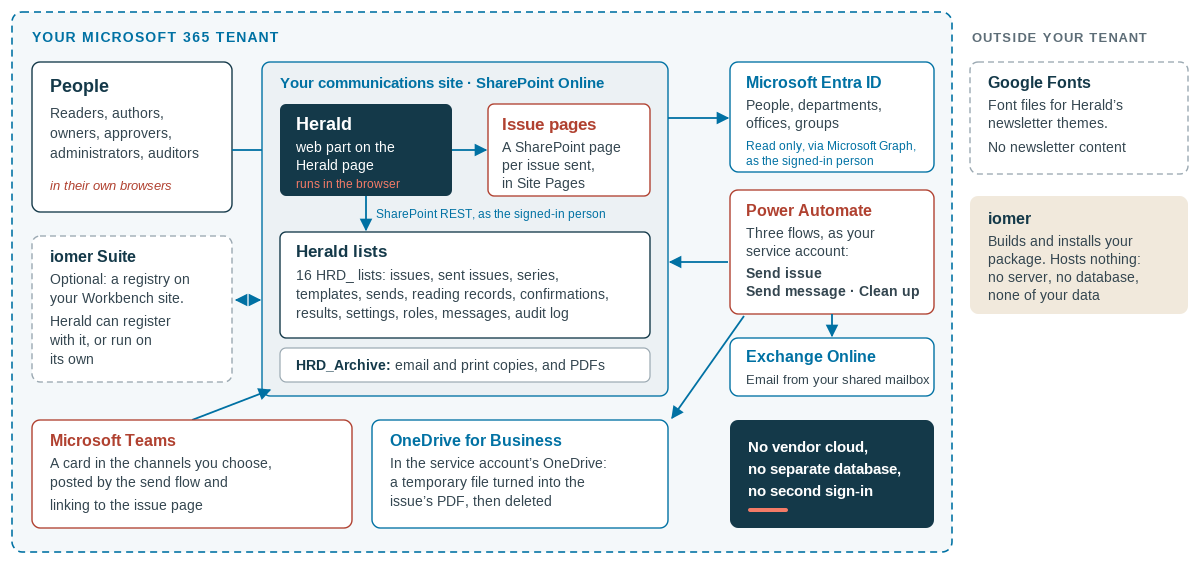
iomer sets up Herald as a single deployment package and installs it in your own tenant: a SharePoint Framework web part, a set of SharePoint lists and a SharePoint page for every issue sent, all on one site. It reads the directory with two delegated Microsoft Graph permissions, and three Power Automate flows send each issue from your own shared mailbox, running as your service account. There’s no vendor cloud and no second sign-in.
Download the IT overview (PDF, no form)
Architecture overview · 2-minute read
How Herald fits into Microsoft 365
| Part | What it is |
|---|---|
| Package | One SharePoint Framework package (.sppkg), Herald by iomer, in your tenant app catalog. A separate demo package, for training, saves nothing |
| Where it runs | A Herald page on your communications or news site, in a full-width section, and a SharePoint page for every issue sent (herald-<issue>.aspx) |
| How it runs | In the browser of whoever has the page open: SharePoint REST for its lists and pages, and Microsoft Graph, as the signed-in person, to read the directory. Sending runs in Power Automate |
| Data | Sixteen lists on the Herald site, named with the prefix HRD_: issues, sent issues, series, campaigns, templates, content sources, sends, approvals, reading records, confirmations, results, settings, roles, preferences, messages and the audit log. Plus the HRD_Archive library for email and print copies and PDFs, and a list that records the setup version |
| Permissions | Two delegated Microsoft Graph permissions: User.Read.All and GroupMember.Read.All. Herald never writes to the directory |
| Automation | Three Power Automate flows, Send issue, Send message and Clean up reading records, running as your service account on standard connectors. Nothing is sent without Send issue |
| Access | SharePoint permissions are the security boundary. Herald’s Setup checks compare each list with the permission design, and Apply permissions sets it once a site owner has read the planned changes. An issue’s page, record and PDF can be limited to its audience |
| Hosting | None by iomer: no server, database or app registration of ours |
Download the IT overview (PDF)Download the datasheet (PDF, 2 pages)Watch the 55-second tour
How Herald reaches your tenant
One package, built for you and installed by iomer
Herald is a solution accelerator, not a product you download and set up yourself. We build a single deployment package for your organization and run the installation with your Microsoft 365 admin. Nothing is hosted by iomer: once it’s installed, Herald runs entirely in your tenant.
Built for your organization
Your series, audiences, templates, newsletter brand, approvers, content sources and Teams channels are agreed with you and set up in your package. They’re data in your lists, so your administrators can change them later without a release.
Installed by iomer
We add the package to your app catalog, take your SharePoint administrator through the two Graph approvals, run the guided setup with a site owner, create the Herald groups, apply the permission design, and install the three flows with your service account and shared mailbox.
Changed the same way
Changes to the web part come as a new version of your package, built, tested and installed by iomer. If a version adds lists or columns, the guided setup adds them; nothing is renamed or removed, and your data stays.
The same in every build
A foundation your team reviews once
- The Herald web part and the list design
- Two delegated Graph permissions, read only
- The list permission design, checked and applied from Herald
- The three flows, which send only while sending is switched on in Herald
Specific to your build
Your organization’s settings, built in
- Series, audiences, topics and their owners
- Templates, mastheads and the newsletter brand
- Approvers, content sources and Teams channels
- The shared mailbox, how small a group results can show, and how long reading records are kept
What differs between organizations is mostly configuration, not new code, so the foundation your security review looks at stays the same from build to build.
Security and data residency
Where your data lives
Herald adds no new place for your content to live. Every issue, setting, reading record and audit entry is a SharePoint list item, page or file on one site in your own tenant.
- Records follow your existing Microsoft 365 security, retention and data residency settings, so they’re stored wherever your SharePoint content is.
- Flow run history lives in your Power Platform environment, which has its own region. We check both locations with you before installation. Each PDF is made from a temporary file in the service account’s OneDrive, deleted straight after.
- Everything Herald does in the browser runs as the signed-in person, so SharePoint permissions decide what each person can open; the flows run as your service account. Once permissions are applied and people are in their Herald groups, drafts are for Herald’s roles only, and a secured issue’s page, record and PDF are limited to the people it was sent to, site owners and Herald’s own groups.
- When someone opens an issue’s page, Herald saves in their name which sections they read, the links they followed, the channel and their confirmations. Each reader sees only their own; Herald owners, administrators and auditors can read them all in SharePoint, because Herald works out results from them. Herald’s screens show totals only, groups smaller than the size you set (five people unless you change it) are merged, and reading records are deleted after your retention period. Reading inside an email isn’t recorded: there’s no tracking pixel.
- No separate database, server or vendor cloud. Nothing is hosted by iomer. Email goes only to addresses in the one email domain set when the flows are built; tell us during planning if your staff use more than one. The one outside request is readers’ browsers loading the newsletter themes’ font files from Google Fonts, which shows Google their IP address, as any web request does. No newsletter content or reading record goes with it.
- Your content is stored by Microsoft 365, which Microsoft independently audits against standards such as ISO/IEC 27001 and SOC 2. Those reports cover Microsoft 365 itself, not iomer, and are in Microsoft’s Service Trust Portal.
Microsoft 365 updates
Built to keep working through Microsoft 365 updates
Herald’s data, permissions and sending use supported interfaces: the SharePoint Framework, SharePoint REST, delegated Microsoft Graph and standard Power Automate connectors. Two layout features depend on how SharePoint draws its pages, hiding SharePoint’s page bar and keeping Herald’s top bar in place as the page scrolls; a SharePoint change could affect how those look, not your data or sending.
- SharePoint Framework, for the web part
- SharePoint lists and modern pages, for every record and issue
- Microsoft Graph with delegated read permissions, for people, offices, departments and groups
- Power Automate flows on standard connectors that read Herald’s settings on every run
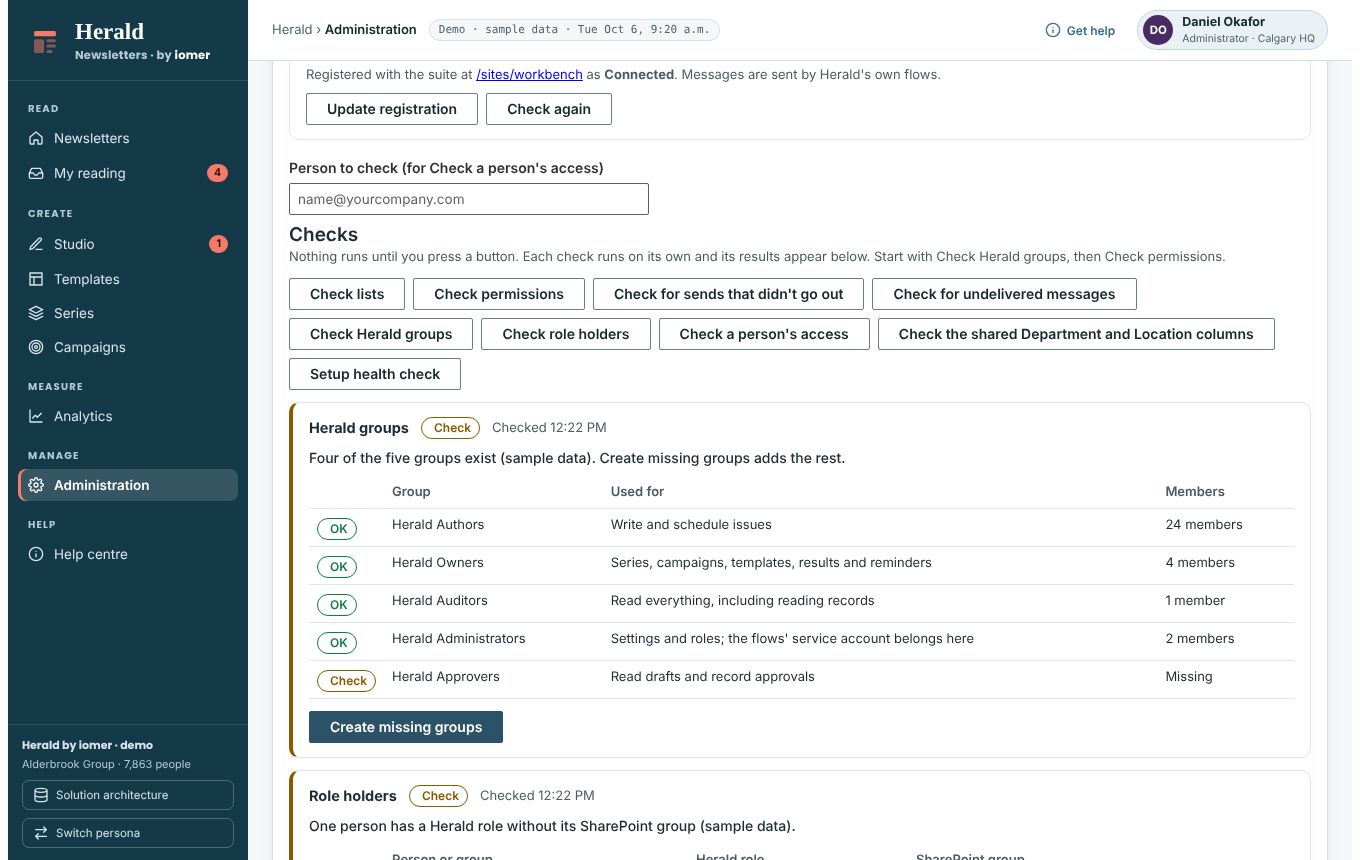
- A setup health check that compares every list, column, index and view with Herald’s design, with Repair
When Microsoft changes something Herald relies on, the change reaches you the same way as any other: a new version of your package, built, tested and installed by iomer.
Licensing prerequisites
Microsoft 365 plans Herald works with
| Microsoft 365 plan | Reading issues on the intranet and in Teams | Getting the email | Writing, approving and owning |
|---|---|---|---|
| E5 | Included | Included | Included |
| E3 | Included | Included | Included |
| Business Premium (up to 300 users) | Included | Included | Included |
| F3 (frontline) | Included | Included, in its kiosk mailbox | Check with your licensing partner |
| F1 (frontline) | Included | No mailbox: read on the intranet or in Teams | Check with your licensing partner |
Readers, authors, approvers and owners need no add-on licence for Herald. The flows need one more licensed account: a service account with Exchange Online, OneDrive and Power Automate, on standard connectors only. Frontline plans carry smaller SharePoint and Exchange rights, so check them with your licensing partner. Microsoft changes plan contents, so check before you buy.
Herald uses SharePoint Online, Exchange Online and Microsoft Graph, which these plans include, so everyone who reads, writes, approves or owns newsletters needs only their Microsoft 365 account. People without a mailbox read issues on the intranet or in Teams. The three flows use only Power Automate’s standard SharePoint, Office 365 Outlook, OneDrive for Business and Microsoft Teams connectors, so no premium Power Automate licence is needed; they run as one service account with a Microsoft 365 licence that includes Exchange Online, OneDrive and Power Automate, and send from a shared mailbox. Microsoft changes plan contents, so check before you buy.
Specifications
What runs where
- Hosting
- One SharePoint Framework package (.sppkg) in your tenant app catalog, built on SharePoint Framework 1.24 (release 2.0.1 uses the release candidate, 1.24.0-rc.0) and React 18. The Herald web part runs in a full-width section of a modern page on your communications or news site, optionally full screen. Nothing is hosted by iomer.
- Identity
- Microsoft Entra ID through Microsoft Graph, for people, their departments and offices, and groups. People sign in with their existing Microsoft 365 accounts.
- Data
- Sixteen HRD_ lists and the HRD_Archive library on the Herald site, created by the guided setup, plus a SharePoint page per sent issue in Site Pages.
- Permissions
- User.Read.All and GroupMember.Read.All, delegated, read only. The demo package requests none.
- Flows
- Three, as your service account, on standard connectors. Send issue publishes the issue page, makes the PDF, emails it from your shared mailbox and posts to Teams at the chosen time. Send message emails approvers, authors and reminders. Clean up deletes reading records nightly after your retention period.
- Each Entra group with an address gets the issue at that address; offices, departments and named people get it in blind copy, 400 to a message, and nobody gets it twice. Only addresses in one email domain, set when the flows are built.
- Search
- Sent issues and the archive stay visible to Microsoft 365 search and Copilot for people who can open them. The working lists are hidden from Site contents by default, and SharePoint search doesn’t index hidden lists.
- Roles
- Reader, Author, Owner, Approver, Auditor and Administrator, matched to five Herald SharePoint groups. Site owners are always administrators, and Entra ID groups can hold roles.
- Audit
- Every change made in Herald recorded in its audit log, with who, what, before and after, and exportable as CSV.
- Accessibility
- Keyboard and screen reader support, and newsletter brand colours checked to 4.5:1 contrast. iomer’s own automated tests run axe-core checks for WCAG 2.2 AA on every screen and dialog at five widths.
- Also included
- A Help centre inside Herald with every guide, and a demo package with sample newsletters for training, which saves nothing.
Before you start
What you need
- Microsoft 365 with SharePoint Online, modern pages and a tenant app catalog
- A SharePoint administrator to approve two delegated Microsoft Graph permissions
- A site owner on the site that will hold Herald, for the guided setup
- A shared mailbox for the newsletters
- A licensed service account with Exchange Online, OneDrive and Power Automate, Send As on the shared mailbox, and the SharePoint, Office 365 Outlook, OneDrive for Business and Teams connectors in the same data group of any data loss prevention policy
- Departments and office locations recorded in Entra ID
- A Microsoft 365 admin to approve the installation with us
Delivered by iomer
What we do
- Agree your series, audiences, templates, approvers and channels with you
- Build your organization’s deployment package
- Install it in your tenant and test it there, flows and test sends included
- Pilot it with one series and one audience
- Launch with training for authors, approvers and newsletter owners
For your IT team
Plain facts to plan around
The details a Microsoft 365 admin asks about in the first meeting.
The permission grant
Graph permissions for SharePoint Framework solutions are approved once on the API access page. They’re delegated, so Herald reads the directory as the person using it, and the approval applies to every SharePoint Framework solution in the tenant, which is how SharePoint handles API access. Without it, Herald still emails groups at their addresses, but can’t count people or send by office or department.
Roles need their groups
A Herald role decides what Herald shows; the matching SharePoint group decides what SharePoint lets someone save. Setup checks lists anyone with a role who isn’t in their group, and can add them. A series’ approver needs the approver role and group to read drafts.
The flows’ service account
The service account needs a Microsoft 365 licence, Send As on the shared mailbox, direct membership of Herald Administrators, and Full Control on the Herald site through its Owners group, because the send flow creates a SharePoint group for each secured issue and sets the permissions of its record, page and PDF folder. Power Automate turns a flow off after 90 days without a run (for owners without Premium) and after 14 days of failures, so your administrators check the flows each quarter. Email goes only to your email domain, and anything the flows see more than a day after it was queued is marked failed, not sent.
Hidden lists and search
SharePoint search never indexes a hidden list. In Herald 2.0.1 the sent issues and the archive stay visible, off the site’s navigation, so Microsoft 365 search and Copilot find them for people who can open them. The working lists are hidden from Site contents by default, and SharePoint search doesn’t index hidden lists.
Exchange’s limits
Exchange limits the shared mailbox to 10,000 recipients a day. An Entra group with an email address counts once; offices, departments, named people and audiences with someone left out go in blind copy, 400 to a message, and every person counts, as do confirmation reminders. Each email goes through Microsoft Graph, which limits a message to about 4 MB including pictures and an attached PDF. Every message sent stays in the shared mailbox’s Sent Items. We size your largest sends with you before go-live.
Results come from owners’ visits
Herald works out results in the browser of a Herald owner or administrator when they open Analytics, not overnight. If nobody with those roles opens it, results aren’t updated, and the clean-up flow keeps those reading records until they are.
Where it’s been tested
Herald 2.0.1 is built and checked in iomer’s automated test harness, on every screen for every role, but hasn’t yet been installed on a SharePoint tenant, iomer’s or a client’s. Version 1 was installed on iomer’s own tenant in October 2026 with all three flows, and on 8 October an issue went out by email from the send flow. Not yet run on a tenant: issues secured to their audience, sending to named people, the upgrade to 2.0, search and Copilot with 2.0.1, and very large directories and audiences. We install and test your build in your tenant, those included, before anyone uses it.
Data quality
Audiences by office or department, results by location and reminders to people who haven’t confirmed depend on the department and office data in Entra ID. If the data needs tidying, we plan that before go-live.
Could IT build this?
A Power Automate email and a list are the easy part
A flow that emails a list of links gives you an email. It doesn’t give you an issue built from live SharePoint content that freezes when it’s scheduled, one layout sent as a page, an Outlook-ready email, a PDF and a Teams card, or audiences counted from your directory with nobody emailed twice.
It also doesn’t limit each issue’s page to its audience, record who confirmed which section, work out reach by location while merging small groups, check the newsletter brand for contrast, or apply a permission design to every list. That design work is what Herald brings, already built.
Bring your IT team to the walkthrough
Book a walkthrough and we’ll go through the package, lists, permissions and flows behind Herald, and answer your security and privacy questions. Bring the people who’ll approve the installation.